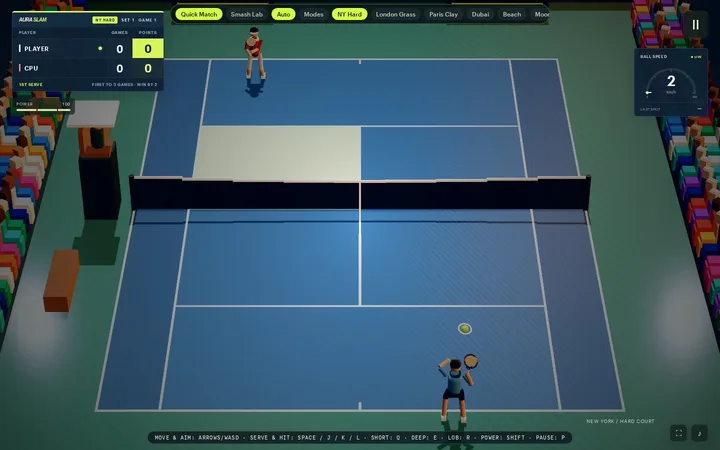
Aura Slam 3D
Tennis with six stadiums and two-bone IK athletes.
Technical proof Quick Match and Smash Lab are playable; tournament and online modes are not in this version.
Aura3D is the TypeScript engine for agent-written browser 3D that ships the whole stack: lighting looks, typed and licensed assets, Rapier physics, Recast navigation, a game kit and deploy checks. The three.js version of the same scene is 38 lines before orbit controls.
No renderer setup, loader wiring or dispose loops.
import { camera, createAuraApp, interactions, looks, model, scene } from "@aura3d/engine";
import { assets } from "./aura-assets";

createAuraApp("#app", {
  scene: scene()
    .add(looks.preset("product-studio"))
    .add(model(assets.product, { name: "product", targetHeight: 1.6, castShadow: true }))
    .add(interactions.orbit({ target: "product" }))
    .camera(camera.frameAsset(assets.product, { targetHeight: 1.6 })),
  ...looks.appOptions("product-studio")
});
Line counts include imports and skip blank and comment lines. The three.js version is in tools/bench-vs-threejs/tagline/ in the Aura3D repo.
Both scenes load the same GLB with HDR studio lighting, a shadow-casting key light, tone mapping and a framed camera. Aura3D adds orbit controls in the same 10 lines.
import * as THREE from "three";
import { GLTFLoader } from "three/addons/loaders/GLTFLoader.js";
import { HDRLoader } from "three/addons/loaders/HDRLoader.js";

const renderer = new THREE.WebGLRenderer({ antialias: true });
renderer.setPixelRatio(Math.min(devicePixelRatio, 2));
renderer.setSize(innerWidth, innerHeight);
renderer.toneMapping = THREE.NeutralToneMapping;
renderer.shadowMap.enabled = true;
document.querySelector("#app")!.appendChild(renderer.domElement);

const scene = new THREE.Scene();
scene.background = new THREE.Color("#2b2f36");
const camera = new THREE.PerspectiveCamera(35, innerWidth / innerHeight, 0.1, 100);
const pmrem = new THREE.PMREMGenerator(renderer);
new HDRLoader().load("/hdri/studio_small_08_1k.hdr", (hdr) => {
  scene.environment = pmrem.fromEquirectangular(hdr).texture;
  scene.environmentIntensity = 1.1;
  hdr.dispose();
});

const key = new THREE.DirectionalLight("#ffffff", 2.4);
key.position.set(6.52, 18.39, 13.98);
key.castShadow = true;
key.shadow.mapSize.set(2048, 2048);
scene.add(key);

new GLTFLoader().load("/aura-assets/product-fixture.glb", (gltf) => {
  gltf.scene.traverse((o) => { if ((o as THREE.Mesh).isMesh) o.castShadow = o.receiveShadow = true; });
  scene.add(gltf.scene);
  const box = new THREE.Box3().setFromObject(gltf.scene);
  const center = box.getCenter(new THREE.Vector3());
  const dist = box.getSize(new THREE.Vector3()).length() / (2 * Math.tan((camera.fov * Math.PI) / 360));
  camera.position.copy(center).add(new THREE.Vector3(0.5, 0.35, 1).normalize().multiplyScalar(dist));
  camera.lookAt(center);
});

addEventListener("resize", () => {
  camera.aspect = innerWidth / innerHeight;
  camera.updateProjectionMatrix();
  renderer.setSize(innerWidth, innerHeight);
});
renderer.setAnimationLoop(() => renderer.render(scene, camera));import { camera, createAuraApp, interactions, looks, model, scene } from "@aura3d/engine";
import { assets } from "./aura-assets";
createAuraApp("#app", {
scene: scene()
.add(looks.preset("product-studio"))
.add(model(assets.product, { name: "product", targetHeight: 1.6, castShadow: true }))
.add(interactions.orbit({ target: "product" }))
.camera(camera.frameAsset(assets.product, { targetHeight: 1.6 })),
...looks.appOptions("product-studio")
});Also in our benchmark: a PBR viewer with HDR lighting, shadow, bloom and orbit controls in 24 lines instead of 49, with 1 import instead of 8. In the Aura3D benchmark (five small scenes, one author, counted in lines of scene code), four of them need up to 51% less scene code.
Measured on the published package (benchmark run of 2026-10-28): a one-cube scene reaches its first frame in about 420 ms and draws in 1 call, and a PBR viewer scene with a shadow and bloom draws in 25. The five benchmark scenes log no console warnings or errors. Software WebGL2 on a remote runner, one run, not GPU numbers.
See the benchmarkthree.js gives you a renderer. Aura3D gives you the renderer, the lighting, the asset pipeline, the game kit and the deploy checks, typed end to end and built for AI coding agents.
| Need | With Aura3D | With three.js |
|---|---|---|
| Studio lighting and shadows | One looks.preset() call: HDRI, key light, shadows, grade. |
PMREM, lights, shadow flags and tone mapping by hand. |
| Bloom, AO, custom post pass | effects.bloom(), effects.shaderPass(). |
EffectComposer plus 3 to 4 addon passes. |
| Loading a model | model(assets.robot): typed key, compile-time check. |
GLTFLoader and a string path. |
| Asset licensing | Source, licence, author and sha256 recorded per model. | Not tracked. |
| Production safety | Unverified models don't draw. | Any URL loads. |
| Game shell | HUD, touch, juice, session, audio cue bank. | Not included. |
| Replay and QA | Fixed-step loop, seeded RNG, QA hooks. | Write your own. |
| 120 and 144 Hz displays | Render interpolation built in. | Write your own. |
| Blank-screen recovery | Safety net with black-frame self-heal. | Not included. |
| AI coding agents | llms.txt, 14 skills, recipes in every new project. |
No official agent docs. |
Every one is a real Aura3D route, not a video. Nothing loads until you press Play.
Tennis with six stadiums and two-bone IK athletes.
Technical proof Quick Match and Smash Lab are playable; tournament and online modes are not in this version.
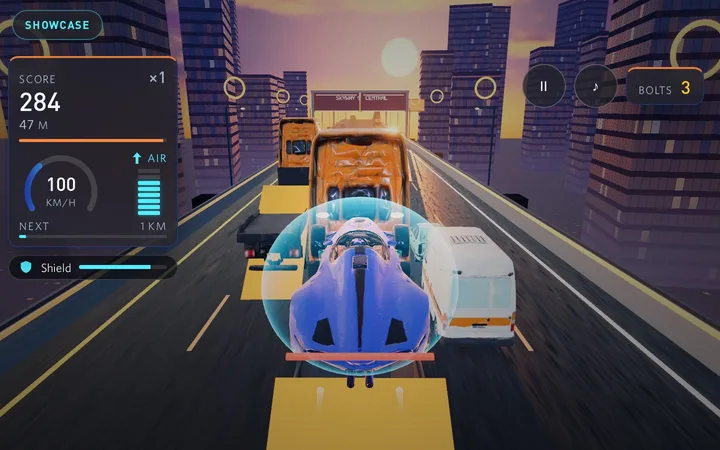
Thread an interceptor through sunset gridlock.
Technical proof 10 typed vehicle GLBs and sky-lane racing with thrusters.
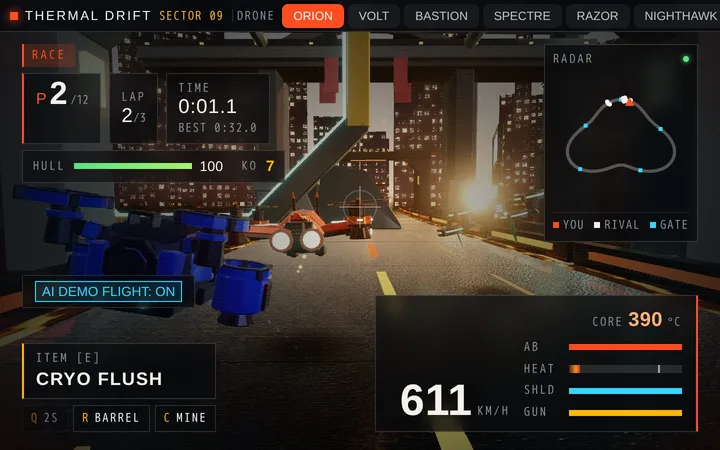
Race armed ramjet drones through a rain-soaked megacity.
Technical proof 7 selectable drones with laser cannons and homing missiles on three circuits.
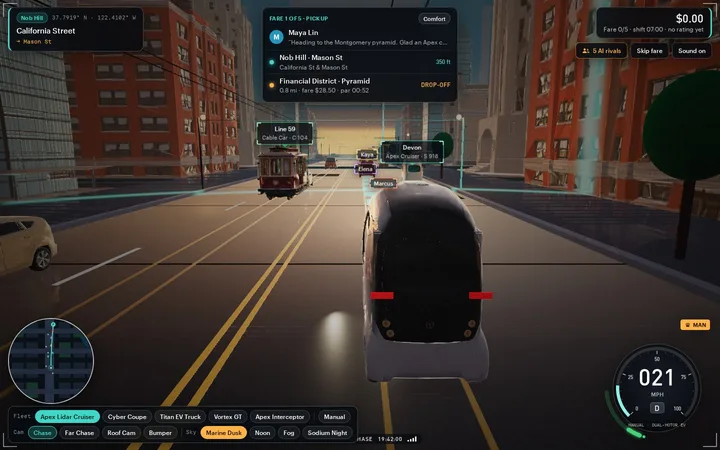
Drive a city grid as a robotaxi or a sports car.
Technical proof A live vector minimap and floating name tags on the AI rival cars across the city grid.
Also playable: Iron Crown, Pip's Big Leap, Aura Hoops 3D, Aura Diamond 3D, Aura FC 3D, Aura Links 3D, Bunker Zero, Slingshot Siege, Glint Courier, Cross Hop, Craterline GP, Chroma Roll, Serpentine Sky Run, Gridlock Courier, Ion Circuit, Shadowstep Gauntlet, Lamplight Line, Saltwind Highway, The Bellkeeper's Walk, Duneglide, and Cumulus Dash.
See all 25 gamesAdd a GLB or pull a CC0 model by name. The CLI records its source, licence, author and sha256, then generates a typed key, so a missing asset is a compile error instead of a blank screen. In production, a model without a valid hash doesn't draw.
aura3d assets search "robot"# Hash, copy, inspect, and type a local GLB.
npx @aura3d/cli@4.7.8 assets add \
./model.glb \
--name robot \
--public-path /aura-assets/
# Writes:
./aura.assets.json
./src/aura-assets.tsimport { createAuraApp, looks, model, scene } from "@aura3d/engine";
import { assets } from "./aura-assets";
createAuraApp("#app", {
scene: scene().add(looks.preset("product-studio")).add(model(assets.robot)),
...looks.appOptions("product-studio")
});HUD, touch controls, juice and session flow. An audio cue bank and step sequencer. A fixed-step loop, seeded replay and QA hooks. Smooth motion on 120 and 144 Hz displays.
Every new project ships llms.txt, 14 Aura3D skills and compiled recipes for Claude, Cursor and Codex. Typed APIs and loud errors keep agent-written code on the rails.
Describe a scene, get a deterministic animated short. Your coding agent directs it through a validated CLI; no bundled model or API key.
20 templates, from product viewers and cinematic scenes to mini-games, racing, fighting and character control. Each one is a normal Vite app you own, with tests.
Search docs for install, asset add, templates, deployment, and troubleshooting.
No docs match that search. Try templates, assets, or deploy.
Paste one into your coding agent.
Build a product viewer for a supplied GLB with studio lighting and orbit controls.
Create a dusk scene with volumetric fog, bloom, and a slow camera push.
Make a falling-blocks game with scoring, pause, and keyboard and touch controls.
Add a physics playground with ramps, crates, contact shadows, and a reset button.
Generate a night city block with lit windows, traffic lights, and a day/night toggle.
Write agent rules that use typed Aura3D assets and public SDK imports only.
Aura3D ships 24 public packages; the eight below cover the engine and the tools around it.
aura3d check-deploy fails the build when a hashed asset is missing, a stray file sneaks into dist, or a model fails validation. Add --browser to load every route in headless Chromium and fail on failed requests and console errors, or --release for licence and quality gates.
dist fail the check.check-deploy --browser flags failed requests when a route boots.check-deploy --browser reports console errors on the routes you ship.--release adds licence and quality gates.| Browser | WebGL2 | WebGPU | Notes |
|---|---|---|---|
| Chrome | Verified | Opt-in | Primary development target |
| Edge | Chromium | Opt-in | Follows the Chrome channel |
| Safari | Expected | Limited | Test the version you support |
| Firefox | Expected | Limited | Test the version you support |
Chrome is the verified target behind the route evidence. WebGL2 is the default elsewhere; test Safari and Firefox on the versions you support. WebGPU stays opt-in and route-scoped. See the route evidence.
The agent writes code. You bring the assets. Aura3D is not a hidden runtime generator: scaffold a template, add a typed asset and ship a route you can check.
MIT (declared in package.json)